Develop a TUI with visual feedback
Give your coding agent a Betamax tape and it can run your TUI, inspect screenshots and terminal cells, and replay interactions after each change. Keep the tape for CI, then slow the recording down for a PR or documentation.
In ratatui-diff’s sticky-header PR, scrolling used to push the file path and change counts off screen. The new option keeps them above the source:
let diff = Diff::new(&document).sticky_file_headers(true);// Keep DiffState between frames in the host application.frame.render_stateful_widget(&diff, area, &mut state);Compare the same interaction
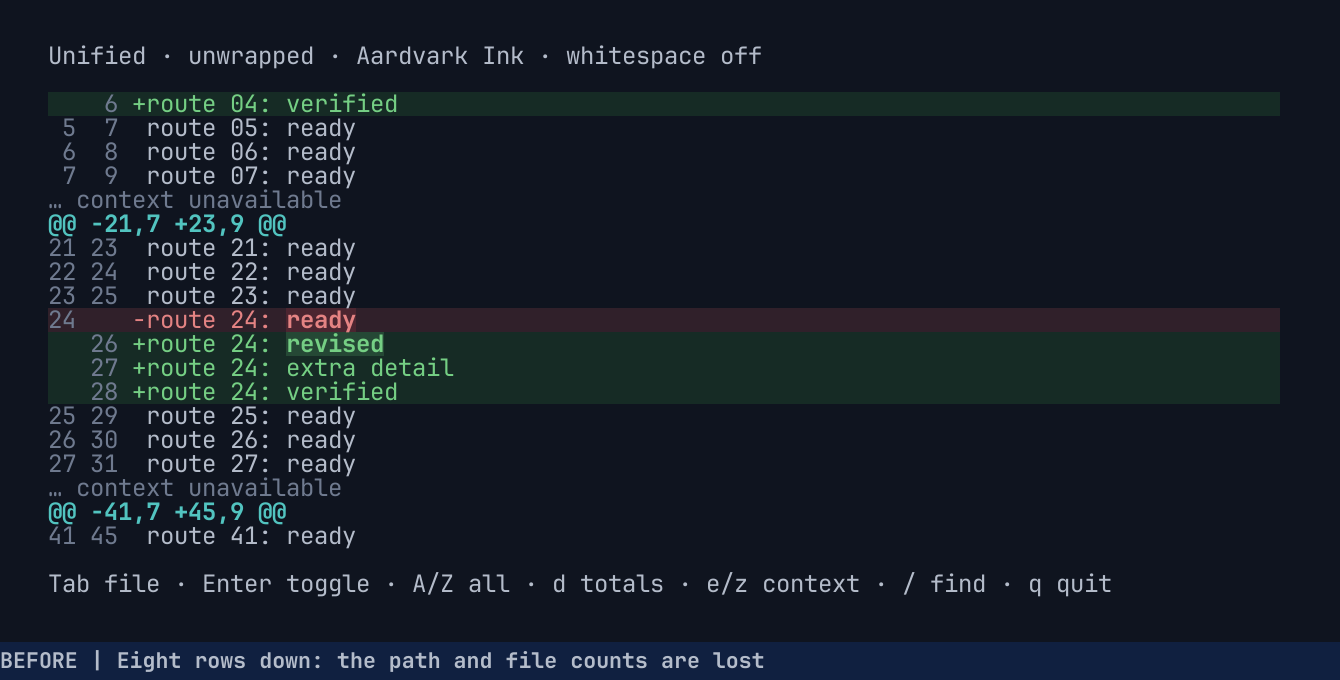
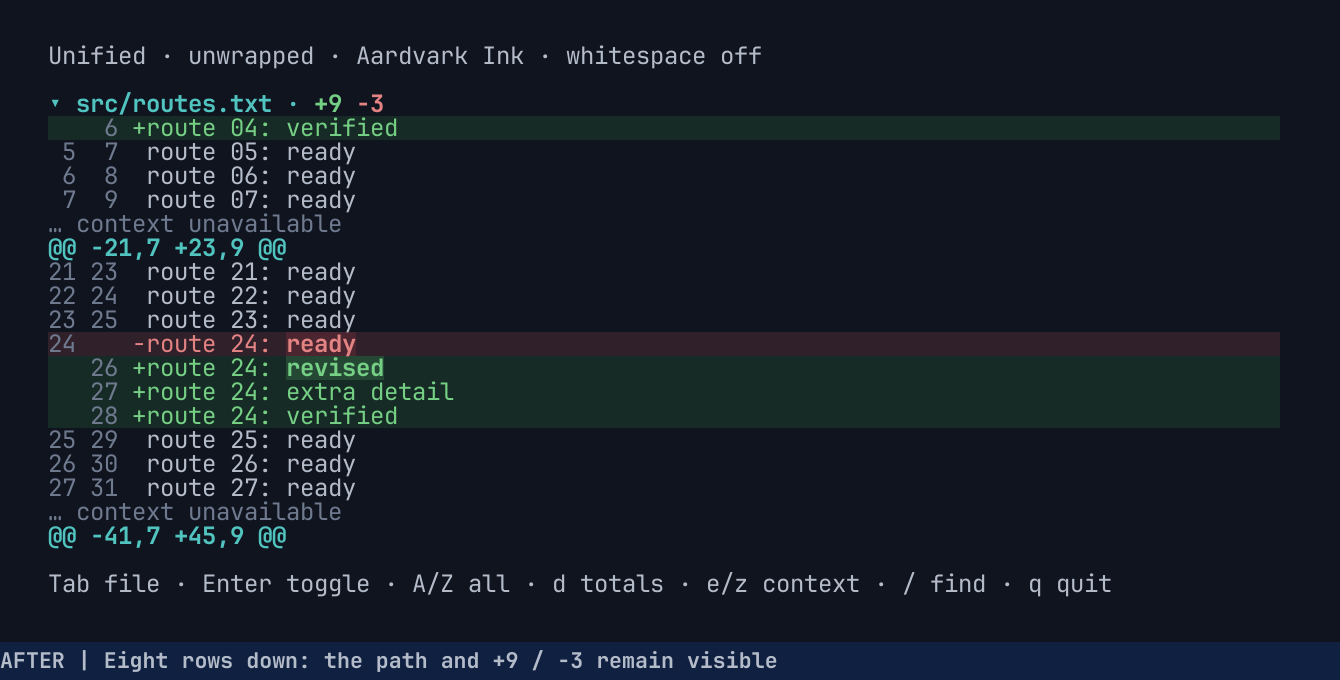
Section titled “Compare the same interaction”The tape pins the theme, font, and 92×25 terminal size, so captures from the two builds line up cell for cell after the same eight down-scrolls.
Before: the file identity has scrolled away.
After: the current path and colored change counts remain above the same source rows.
Play both builds in unified and split views
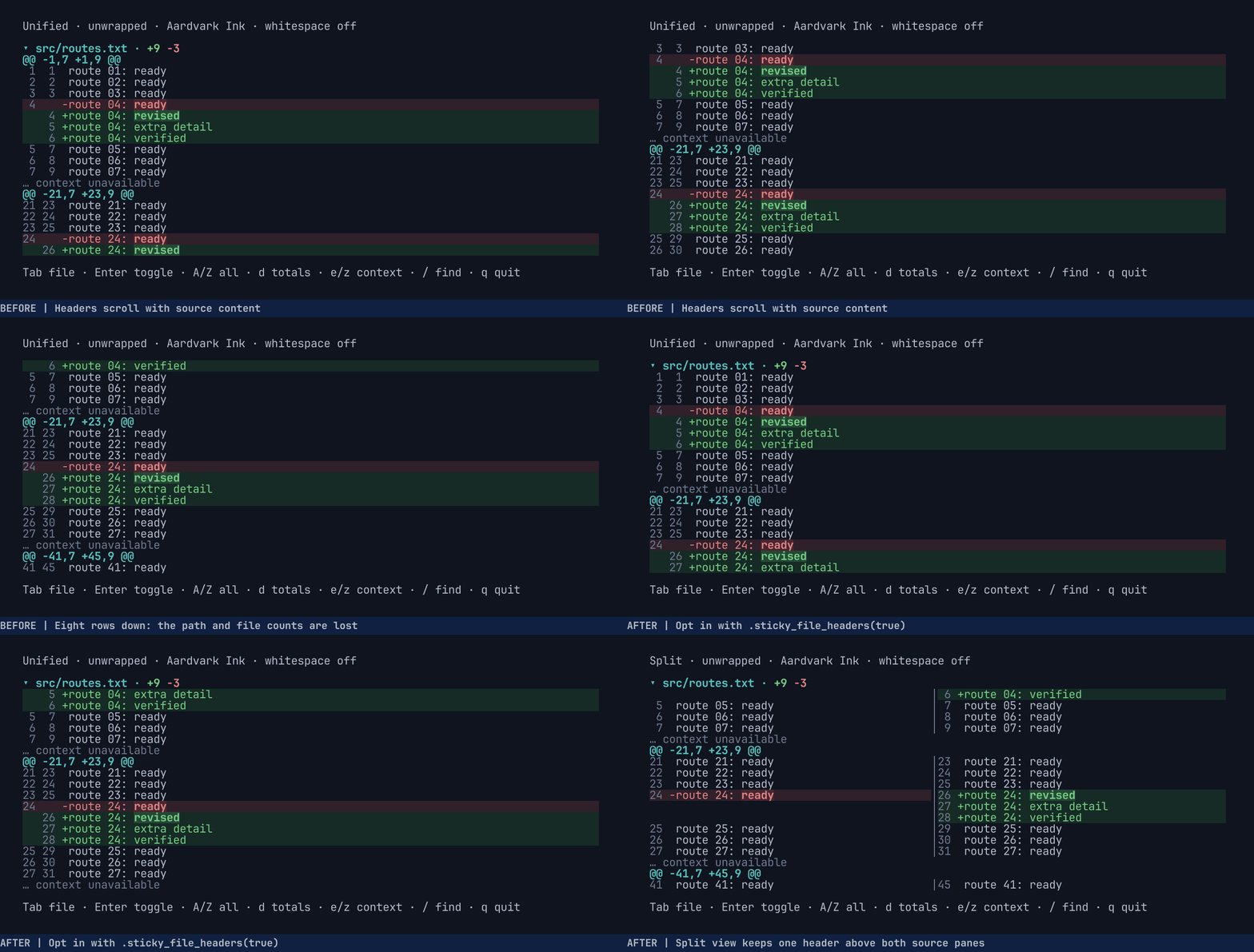
One scenario, several kinds of evidence
Section titled “One scenario, several kinds of evidence”| Output | What it establishes |
|---|---|
| PNG checkpoints | Layout, color, clipping, and alignment for human and agent inspection |
| Cell and style assertions | Specific observable behavior in the running terminal |
| Screen/scrollback JSON | Structured comparisons and failure investigation |
| Recorded GIF | The interaction itself: fast during development, paced for review |
| Documentation images | Images you can regenerate from the tape when the UI changes |
Check the screenshots for spacing, contrast, clipping, and whether the interaction is readable. Use cell assertions for exact text, position, and styles.
Ask your agent to capture a change
Section titled “Ask your agent to capture a change”Name the behavior and ask to see it:
Keep the file path visible while scrolling. Write a Betamax tape that shows the problem, thenfix it. Show me before/after screenshots as you go.The tape format comes from VHS, so most agents can write one without help; the tape reference covers the rest.
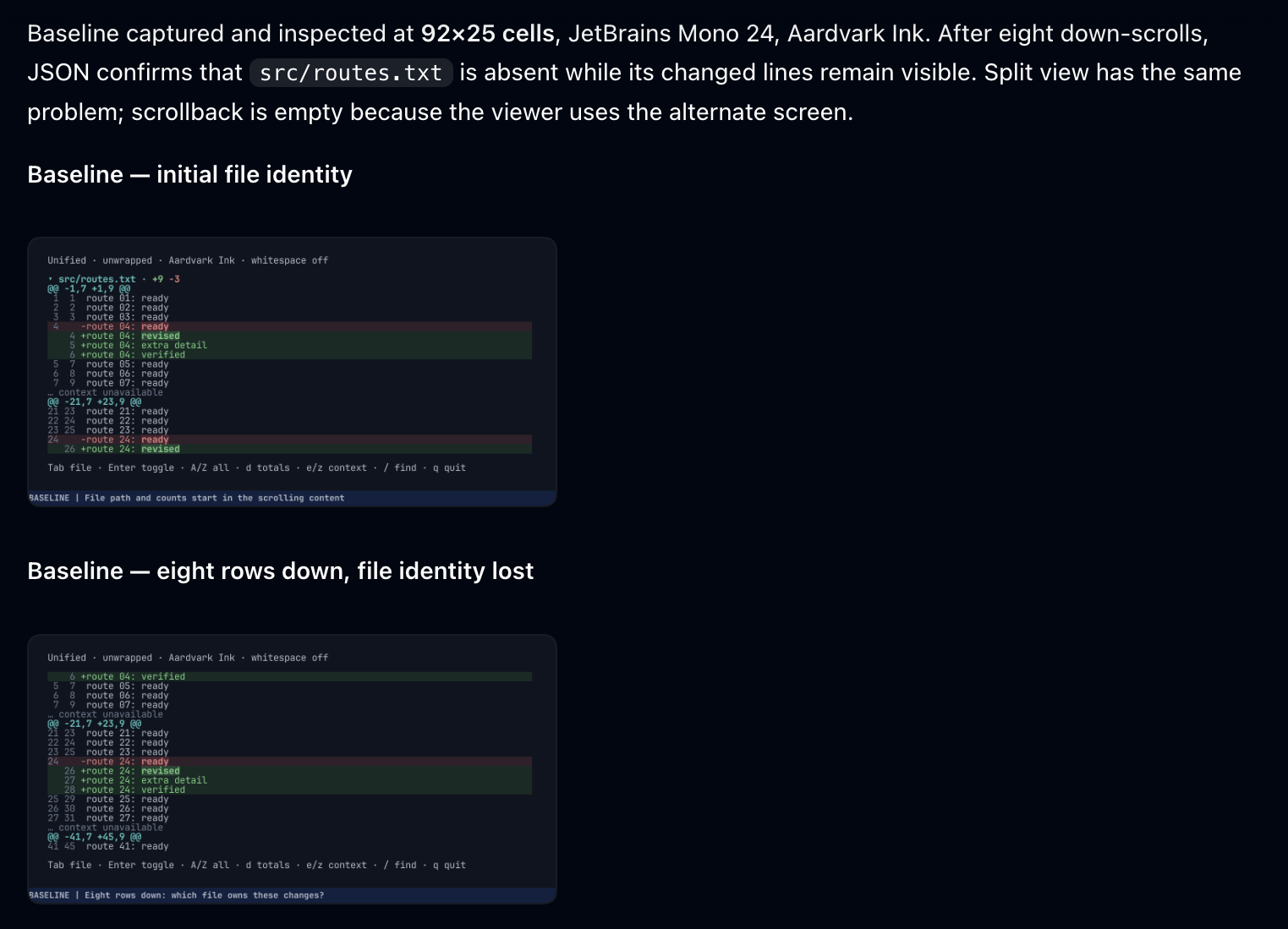
The agent’s first progress update came before it changed any code. It shows the baseline and reports what the state JSON confirmed, so you can check its understanding and steer early:
Assert the bug, then the fix
Section titled “Assert the bug, then the fix”Run the tape against the starting revision first and keep its PNGs and state JSON for comparison.
After eight scrolls, the baseline asserts AssertAbsent "src/routes.txt". With sticky headers, the
same checkpoint asserts the header’s cells and the green addition count:
Type@100ms "jjjjjjjj"# Wait for a hunk header that only scrolling reveals.Wait+Screen "@@ -41,7 +45,9 @@"AssertText "route 24: revised"# Row 3 is the pinned header; column 2 is its fold marker.AssertCells 2 3 '["▾"," ","s","r","c","/","r","o","u","t","e","s",".","t","x","t"]'# "+9" is two cells starting at column 21.AssertStyle 21 3 2 '{"fg":"#75cf84","bg":"#0f141f","bold":true}'
Screenshot media/terminal-ux/sticky/scrolled.pngState media/terminal-ux/sticky/scrolled.json
Coordinates are zero-based cells and exclude image padding and captions. AssertCells takes one
string per cell; AssertStyle takes a width.
Assertions run once output has been quiet for 100 ms, but they do not wait for their condition to
become true. Wait+Screen is what synchronizes with input, so wait on text that only appears once
the input has taken effect. route 24: revised is already on the starting screen; waiting on it
would pass before any scrolling. See terminal testing for more on
synchronization and assertion choices.
Every checkpoint in the tape
| Checkpoint | Interaction | Commands used |
|---|---|---|
| start | Open the multi-file fixture | Wait+Screen, AssertCells |
| scrolled | Scroll eight rows | Type@100ms, Wait+Screen, AssertCells, AssertStyle |
| split | Switch to split view | Type, AssertText, AssertCells |
| narrow | Wrap and resize | Type, Resize, AssertText, AssertCells |
| boundary | Search into another file | Type, Enter, Escape, AssertText, AssertCells |
| folded | Click the pinned file header | MouseMove, MouseDown, MouseUp, AssertCells, AssertAbsent |
| totals | Fold all files and show totals | Type, Home, AssertText, AssertAbsent |
| one-row | Leave one content row | Resize, AssertText, AssertAbsent, State |
| zero-area | Leave no content rows | Resize, AssertAbsent, State |
| end | Unfold and jump to the end | Type, End, AssertText, AssertCells |
The tape saves PNG and JSON for the visible states and JSON alone for the two smallest viewports.
Caption labels the images and GIF without changing terminal cells. The baseline has no pinned
header to click, so its version of the tape folds with Enter.
Run it and read failures
Section titled “Run it and read failures”Set a failure directory so diagnostics land somewhere you can find them:
BETAMAX_FAILURE_DIR=media/terminal-ux/sticky/failures betamax run examples/terminal-ux-sticky.tapeTape errors such as an unknown command (Esc instead of Escape) fail before the application
launches. Runtime failures leave a failure bundle in a
unique subdirectory: report.txt names the failed command, its tape line, and what it waited for,
beside a screenshot and state JSON of the terminal at that moment.
The first run of the new build timed out waiting for src/routes.txt. Its actual.json showed why
(the usage line wraps at 92 columns):
Error: "usage: viewer [--fixture NAME] [--aardvark-ink | --capture VARIANT | --measure VARIANT COLUMNS]"The tape launched the viewer with --sticky-headers, but the viewer’s argument parser did not
accept that flag yet. The agent read the error, fixed argument handling, and reran the tape.
The tape failed. Check the failure screenshot and fix the cause, not the expectation.Compare state JSON
Section titled “Compare state JSON”Checking that the path appears is not enough. A header that overwrites the first source row would
pass that check while hiding a line of the diff. The example’s
comparison script
compares baseline row y with new row y + 1, cell by cell with effective styles, to prove the
header reserves its own row. It also checks file transitions, folding, totals, geometry, empty
scrollback, and the final source line.
Save state JSON at the same named checkpoints in both runs. The header is row 3 in
scrolled.json. Trimmed excerpt; … marks omitted content:
{ "size": [92, 25], … "default_style": { "fg": "#b4bcca", "bg": "#0f141f" }, "styles": [ { "fg": "#52c4c0", "bold": true }, { "fg": "#75cf84", "bold": true }, { "fg": "#e48383", "bold": true }, … ], … "viewport": [ … [" ", ["▾ src/routes.txt · ", 0], ["+9", 1], [" ", 0], ["−3", 2]], … ]}A plain string uses default_style; a pair such as ["+9", 1] applies styles[1] over that
default, so the addition count is #75cf84 on #0f141f, bold. Style indices can change between
captures, so compare resolved styles rather than index numbers.
An agent can check text without interpreting an image:
import jsonfrom pathlib import Path
state = json.loads(Path("media/terminal-ux/sticky/scrolled.json").read_text())assert state["size"] == [92, 25]assert "▾ src/routes.txt · +9 −3" in state["viewport_text"].splitlines()[3]assert state["scrollback_rows"] == 0
scrollback_rows is zero because the viewer uses the alternate screen; scrolling inside the
application does not create terminal scrollback.
To make the same kind of check in a Rust test, run the tape with betamax-core and snapshot the
state with insta; see Snapshot state with insta.
Slow it down for review
Section titled “Slow it down for review”Type "jjjjjjjj" delivers all eight scrolls at once, so the GIF jumps. Type@100ms spaces them so
each scroll is visible. Assertions do not check frame timing, so look at the encoded GIF itself.
Once the assertions pass, ask for a slower recording of the same interaction:
Record a slower before/after GIF of the tape for the PR.The review GIF above uses 300 ms between scrolls and holds each checkpoint for 2.5 seconds.
CI and docs media
Section titled “CI and docs media”The PR’s terminal CI job runs the same tape with
Betamax Terminal Previews and
uploads diagnostics on failure. Adapted from the feature’s CI workflow, after the viewer is built
and RATATUI_DIFF_VIEWER is set:
- name: Sticky-header acceptance and review gallery uses: joshka/betamax-action@v1 env: BETAMAX_FAILURE_DIR: media/terminal-ux/sticky/failures with: version: 0.1.22 sha256: 497c0bbf6da724e90be49e48ade317d99567e4b03e4e86f03c0dac691ec6358f tapes: examples/terminal-ux-sticky.tape formats: png extra-outputs: media/terminal-ux/sticky/*.png comment-key: sticky-headers- name: Retain terminal checkpoints and failure diagnostics if: ${{ always() }} uses: actions/upload-artifact@cf430e030ddbb5b0abf93d22962f4752f3646cd9 # v7.0.2 with: name: terminal-acceptance path: media/terminal-ux/ if-no-files-found: warn retention-days: 14See the GitHub Action guide for version pinning and pull request comments.
For documentation, place the configuration beside its captured result and keep the tape so you can refresh the image when the UI changes. See generated media storage for where to keep the files.
Source
Section titled “Source”- Sticky-header PR
- Acceptance tape and the script that derives the baseline and paced variants from it
- JSON comparison script
- CI workflow
- Walkthrough with build and replay commands
- Evidence release with the captures and failure output