Choose an input
Every diff starts as a DiffDocument. Pick the constructor that matches what your application
already has. Documents are immutable and can be shared by several views.
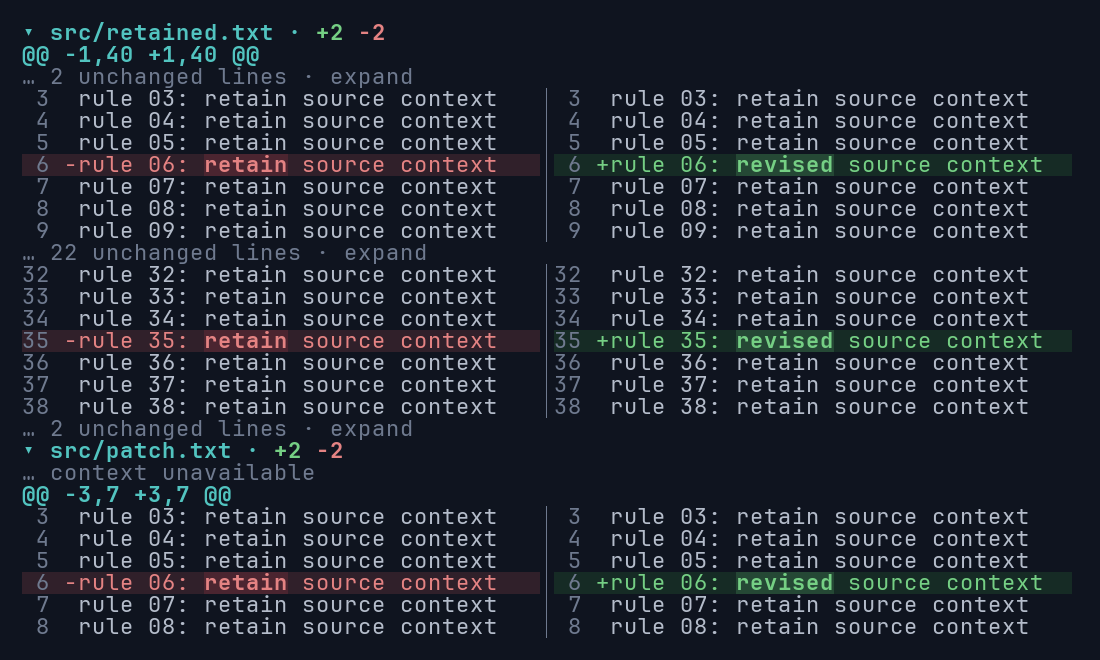
| You have | Use | Context available |
|---|---|---|
| Old and new text | DiffDocument::from_text(old, new) |
Full source; three context lines shown |
| Old and new text, custom hunks | DiffDocument::compare(old, new, n) |
Full source; n context lines |
| A unified or multi-file patch | DiffDocument::parse(patch) |
Only lines present in the patch |
| Your own files, hunks, or lines | DiffDocument::new(files) |
Whatever you supply, validated |
Compare two strings
Section titled “Compare two strings”use ratatui_diff::DiffDocument;
let document = DiffDocument::from_text("timeout_ms: 500\n", "timeout_ms: 1500\n");from_text compares UTF-8 source with three context lines around each change. Use compare to pick
another radius. To keep every unchanged line available for context folding, pass
usize::MAX:
use ratatui_diff::DiffDocument;
let old = "a\nb\nc\n";let new = "a\nB\nc\n";let document = DiffDocument::compare(old, new, usize::MAX);
Identical inputs produce a document with no hunks.
Parse a Git patch
Section titled “Parse a Git patch”use ratatui_diff::DiffDocument;
let patch = "--- a/greeting\n+++ b/greeting\n@@ -1 +1 @@\n-hello world\n+hello Rust\n";let document = DiffDocument::parse(patch)?;assert_eq!(document.files().len(), 1);parse accepts unified diffs and multi-file git diff output, including renames, copies, created
and deleted files, binary files, and metadata-only changes. Parse errors report byte offsets when
available. Combined merge diffs are rejected.
A patch only contains the lines it was generated with. The widget shows omitted regions as
unavailable rather than inventing them, and selection and search never cross those gaps. If your
host can read the full files, comparing them with compare gives the reader expandable context.
Supply structured input
Section titled “Supply structured input”DiffDocument::new validates caller-provided files, hunks, lines, and highlight ranges. Use it when
another tool already computed the diff, or to supply your own word highlights.
Text fidelity
Section titled “Text fidelity”Source content keeps CRLF line endings and final-newline differences. Control characters are shown as visible notation instead of being sent to the terminal. Binary changes appear as one-line summaries, and metadata-only changes (such as a mode change) are labeled.
Large inputs
Section titled “Large inputs”Comparison is synchronous. For large documents, prepare the DiffDocument on a worker thread and
hand it to the UI when it is ready. Rendering reuses the comparison and only draws visible rows, but
the first layout and each resize process the whole document. Very large replacements fall back to
whole-line styling when they exceed the word-comparison limits. See
Performance for measurements.