Navigation and search
All navigation lives on DiffState. Your application decides which keys or mouse events call which
methods; the widget applies the result on the next render.
Scroll and jump
Section titled “Scroll and jump”| Movement | Methods |
|---|---|
| Lines, pages, halves | scroll_lines(n), scroll_pages(n), scroll_half_pages(n) |
| Horizontal (unwrapped) | scroll_horizontal(cells) |
| Start and end | start(), end() |
| Hunks | next_hunk(), previous_hunk() |
| Files | next_file(), previous_file() |
| A source line | scroll_to_source(position) |
Scrolling counts displayed rows, including headers and wrapped continuations. Render at least once first: page sizes and row positions come from the last frame.
use ratatui_core::buffer::Buffer;use ratatui_core::layout::Rect;use ratatui_core::widgets::StatefulWidget;use ratatui_diff::{Diff, DiffDocument, DiffState, Side, SourcePosition};
let document = DiffDocument::from_text("before\n", "after\n");let area = Rect::new(0, 0, 80, 3);let mut buffer = Buffer::empty(area);let mut state = DiffState::new();let diff = Diff::new(&document);diff.render(area, &mut buffer, &mut state);assert!(state.scroll_to_source(SourcePosition {    file: 0,    side: Side::New,    line: 1,}));
SourcePosition identifies a file index, the old or new side, and a one-based line number. Use it
to link a diff to compiler errors, review comments, or an editor cursor.
What is kept between frames
Section titled “What is kept between frames”| Change | Effect on the viewport |
|---|---|
| Resize, wrap, or switch unified/split | Stays at the nearest available source anchor |
| Change theme or word highlights | Layout is reused; nothing moves |
| Render a different document | Navigation, search, and selection reset |
Give each independently scrolled pane its own DiffState, even when both borrow the same document.
Search
Section titled “Search”Search is a case-sensitive literal match over the source the document retains. Set the query from your event handler, then move between matches.
use ratatui_diff::{DiffDocument, DiffState};
let document = DiffDocument::from_text("timeout: 500\n", "timeout: 1500\n");let mut state = DiffState::new();state.set_search(&document, "timeout", None);assert_eq!(state.search_matches().len(), 2);assert!(state.next_match());assert_eq!(state.active_match(), Some(0));assert!(state.previous_match());assert_eq!(state.active_match(), Some(1));
Pass Some(Side::Old) or Some(Side::New) to search one side only. With both sides, shared context
lines count once. Matches follow document order and navigation wraps. An empty query clears search.
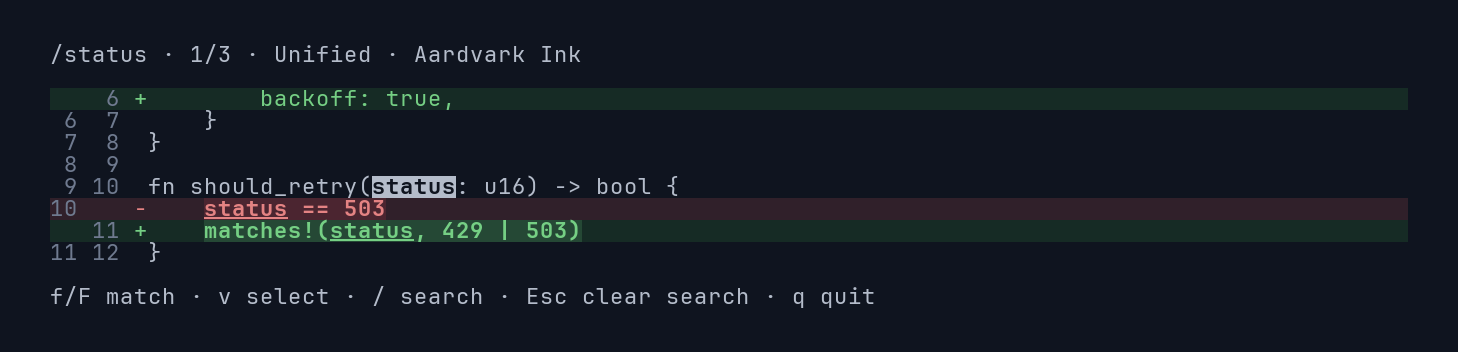
In the viewer, typing /status highlights every match and reports the count:
Pressing f moves to the next match and scrolls it into view:
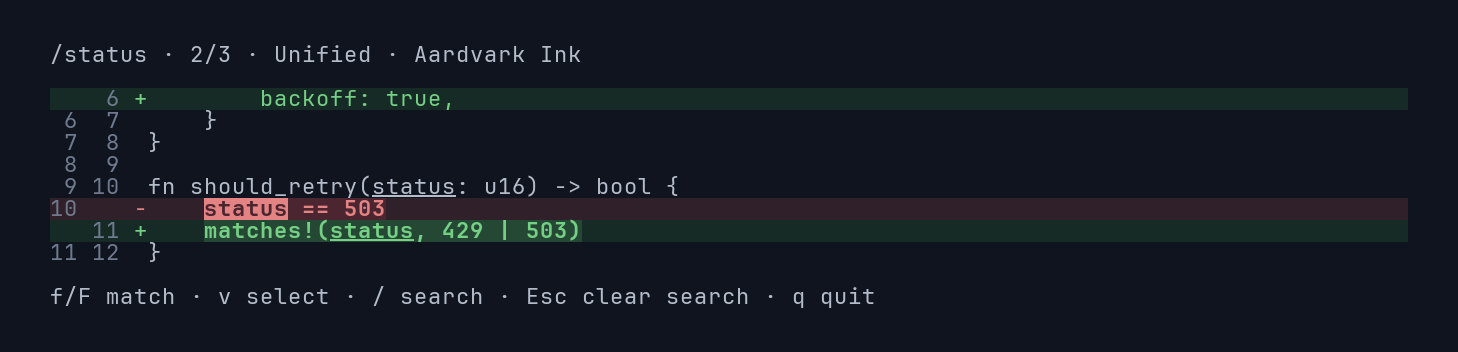
Active matches use reverse video in every theme, including monochrome. Search styles draw over changed-word styles. Matches keep their source byte ranges through wrapping, resizing, and mode changes. Omitted patch context, file headers, and metadata are not searched.
Query updates scan the source synchronously; rendering reuses the results. Updating the query or side clears the active match, while setting the same query again keeps it. Replacing the document clears search; your host can reapply its query afterward.